Using goto Statement
goto statement is used to jump on a particular location in a program defined by label. Label is a name given to a location.
Label is defined by a <locationName> followed by a colon.
goto is use with goto <labelName>;
syntax of label & goto
statment 1;
label: //syntax of label
statment 2;
statment 3;
if(statement) //if condition true
{
goto label;
//jump to label i.e. after statement 1 and program will execute again statement 2 and 3
}
Let Check out Example for better understanding
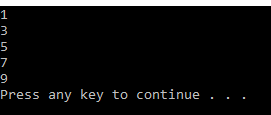
Ex1: Print first 10 Natural Number
#include<iostream.h>
int main()
{
int i=1;
print:
cout << i <<endl;
if(i<10)
{
i++;
goto print; //jump to print label as define above after initialization of i
}
/*
In Above Program we are printing first 10 natural number using goto statment
in this example goto is used as loop to print 1 to 10
first we initialize the variable i to 1
then we define a checkpoint or label for using with goto
then we print value of variable i
we check if variable i is less than 10 if true then increment of variable i and jump to checkpoint or label we define earlier to print again this process continue till condition is false similar in a loop
*/
return 0;
}
OUTPUT

Ex2: Divide Two Numbers [check this program using loop]
#include<iostream.h>
int main()
{
//Divide Two Numbers
char ch;
float a,b;
tryAgain:
cout << "Enter First Number : ";
cin >> a; //Input First Number
cout << "Enter Second Number : ";
cin >> b; //Input Second Number
if(b == 0) // Check for divisor for zero
{
cout << "Error: Number Cannot Divide by Zero"<<endl; //return error message
goto tryAgain;
}
cout << "Answer = " << a/b<<endl;
cout << "Try Again(y/n): ";
if(cin >> ch && ch != 'n')
goto tryAgain;
/*
In this example we are dividing two number and check for divisor not equal to zero
first we define label before taking input from user
then we take input two numbers
if (divisor(here b) = 0) then print error message and goto label; that jump back to a point where we have to take input again
now if divisor is not zero then we print answer and ask user for more
here you can see expression in if condition
if(cin>> ch && ch != 'n')
above if statement has two conditions for check as there is AND(&&) between them means both must be true
check each conditions cin >> ch this will return true when it take input successfully
and then it compare ch != 'n'
means here we are do two operation that first we take input and check for equality in one statement
second condition will run only when we get input from first statement
so if its true then it goto label;
else <end of program>
*/
return 0;
}

goto statement is used to jump on a particular location in a program defined by label. Label is a name given to a location.
Label is defined by a <locationName> followed by a colon.
goto is use with goto <labelName>;
syntax of label & goto
statment 1;
label: //syntax of label
statment 2;
statment 3;
if(statement) //if condition true
{
goto label;
//jump to label i.e. after statement 1 and program will execute again statement 2 and 3
}
Let Check out Example for better understanding
Ex1: Print first 10 Natural Number
#include<iostream.h>
int main()
{
int i=1;
print:
cout << i <<endl;
if(i<10)
{
i++;
goto print; //jump to print label as define above after initialization of i
}
/*
In Above Program we are printing first 10 natural number using goto statment
in this example goto is used as loop to print 1 to 10
first we initialize the variable i to 1
then we define a checkpoint or label for using with goto
then we print value of variable i
we check if variable i is less than 10 if true then increment of variable i and jump to checkpoint or label we define earlier to print again this process continue till condition is false similar in a loop
*/
return 0;
}
OUTPUT

Ex2: Divide Two Numbers [check this program using loop]
#include<iostream.h>
int main()
{
//Divide Two Numbers
char ch;
float a,b;
tryAgain:
cout << "Enter First Number : ";
cin >> a; //Input First Number
cout << "Enter Second Number : ";
cin >> b; //Input Second Number
if(b == 0) // Check for divisor for zero
{
cout << "Error: Number Cannot Divide by Zero"<<endl; //return error message
goto tryAgain;
}
cout << "Answer = " << a/b<<endl;
cout << "Try Again(y/n): ";
if(cin >> ch && ch != 'n')
goto tryAgain;
/*
In this example we are dividing two number and check for divisor not equal to zero
first we define label before taking input from user
then we take input two numbers
if (divisor(here b) = 0) then print error message and goto label; that jump back to a point where we have to take input again
now if divisor is not zero then we print answer and ask user for more
here you can see expression in if condition
if(cin>> ch && ch != 'n')
above if statement has two conditions for check as there is AND(&&) between them means both must be true
check each conditions cin >> ch this will return true when it take input successfully
and then it compare ch != 'n'
means here we are do two operation that first we take input and check for equality in one statement
second condition will run only when we get input from first statement
so if its true then it goto label;
else <end of program>
*/
return 0;
}
Output